
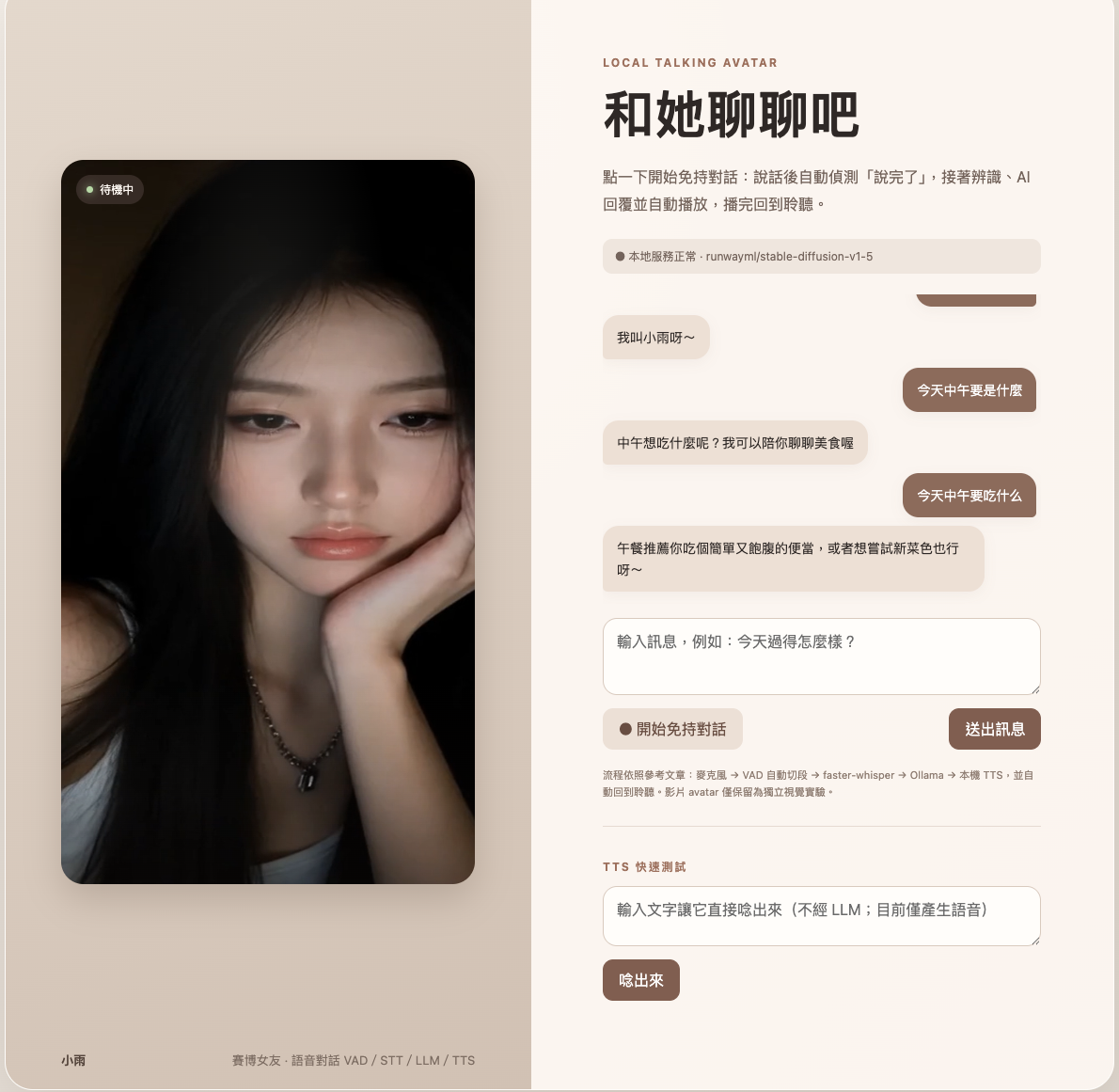
I started building Amayo AI (Xiaoyu · a local AI voice and conversation agent) for a simple reason.
I wanted to know:
Could we run a smooth real-time AI girlfriend with voice and visuals entirely on our own Mac, without calling any cloud API and while keeping all data private?
Many AI voice assistants and cyber-girlfriend projects on the market look smooth on the surface, but if you inspect the network traffic, a large number of them are calling the OpenAI API, ElevenLabs for speech synthesis, or other paid cloud services behind the scenes.
But what if what we actually want is:
- Data that stays 100% local and never passes through a third-party server?
- No need to worry about cloud API charges, token limits, or service outages?
- Full use of Apple Silicon (M1/M2/M3/M4) Unified Memory and MLX/MPS hardware acceleration?
- Complete control over the architecture, so the LLM persona, voice model, or visual driver can be swapped at any time?
That is what led me to build Amayo AI and release the entire project as open source.
📐 System architecture: how does a Realtime Voice Agent work?
Many people assume an AI voice conversation system must be very complicated. Once you strip away the outer shell, however, the core is essentially a tightly coordinated pipeline:
┌───────────────────────── 瀏覽器 UI (web/index.html) ─────────────────────────┐
│   影像生成預覽       免持/按鈕語音對話       文字對話視窗       Avatar 視覺視窗     │
└─────────┬────────────────────┬────────────────────┬──────────────────┬──────┘
          │                    │                    │                  │
          ▼                    ▼                    ▼                  ▼
┌───────────────────────── FastAPI 後端 (app/main.py) ─────────────────────────┐
│  /api/generate-image   /api/voice/respond    /api/chat        /api/avatar    │
│  /api/transcribe       /api/tts              GET /health       /api/status   │
│                                                                              │
│  啟動暖機機制 (@app.on_event("startup")):                                    │
│    ├ 背景預載入 F5-TTS 常駐 worker                                            │
│    └ 對 Ollama 發送測試請求將 LLM 載入記憶體                                 │
└────┬───────────────┬───────────────┬───────────────┬─────────────────────────┘
     │               │               │               │
     ▼               ▼               ▼               ▼
┌───────────┐  ┌───────────┐  ┌───────────┐  ┌──────────────┐
│  STT 模型  │  │ 本地 LLM  │  │  TTS 模型 │  │ 本地影像預覽  │
│  faster-  │  │ Ollama    │  │ F5-TTS-   │  │ Diffusers    │
│  whisper  │  │ Qwen 30B  │  │ MLX Worker│  │ (MPS/CUDA)   │
└───────────┘  └───────────┘  └───────────┘  └──────────────┘
The complete voice interaction loop has five key steps:
- VAD (Voice Activity Detection) silence segmentation: the browser monitors the microphone and automatically sends a segment after the user finishes speaking, defined here as more than 450 ms of silence.
- STT (Speech-to-Text): the FastAPI backend receives WebM/WAV audio and uses local
faster-whisper(with the compact and efficientsmallmodel by default) to transcribe speech into text quickly. - LLM (Language Model): the text is sent through local Ollama using its native
/api/chatendpoint. A Traditional Chinese cyber-girlfriend persona named “Xiaoyu” generates the response. - TTS (Text-to-Speech): the reply is passed to
F5-TTS-MLX, optimized for Apple Silicon, for zero-shot voice cloning and speech synthesis. If F5 is not installed, the system falls back automatically to the built-in macOSsaycommand. - Playback & Visual Sync: the frontend plays the returned WAV audio and triggers dynamic changes in the 9:16 character display on the right.
⚡ Key optimization: how do you avoid multi-second cold-start delays?
When building a local Realtime Agent, one of the hardest details is latency.
If you wait until the user finishes speaking before running import torch, loading the TTS model, and loading the LLM into GPU/RAM, model cold-load time alone can take 3–5 seconds. That completely breaks the experience.
To achieve near-immediate first-token response, Amayo AI uses two key optimizations:
1. Persistent Subprocess Worker
For the TTS module, instead of spawning a command-line process again for every request, we implemented a persistent f5_tts_worker.py worker.
When the service starts, it launches a Python subprocess in the background and keeps both the F5-TTS model and the eight-second reference waveform resident in memory. Incoming requests communicate through JSON-lines over standard input/output (stdin/stdout), avoiding the large cost of loading the model repeatedly.
2. Startup pre-warming
When FastAPI starts, @app.on_event("startup") launches background work:
- Start the F5 Worker early so the first-stage model load is already complete.
- Send a very short test payload (
{"messages": [{"role":"user", "content":"hi"}]}) to Ollama so the chat model is pulled into unified memory in advance.
As a result, by the time the user says the first sentence, the system is already warm.
🤖 Choosing an LLM: 7B vs 14B vs 30B/32B
For local AI voice conversations, the LLM you choose directly determines the tradeoff between response quality and inference speed:
| Model size | Recommended model | Memory requirement | Inference latency | Hands-on experience |
|---|---|---|---|---|
| 7B class | qwen2.5:7b | ~ 4.7 GB | ⚡ < 0.5s | Extremely fast response, good for low-latency use, 16GB Macs, or entry-level hardware. |
| 14B class (🌟 recommended) | qwen2.5:14b | ~ 9.0 GB | 🚀 ~ 0.8s | The best balance. Traditional Chinese casual speech, emotional tone, naturalness, and response speed all perform very well. |
| 30B / 32B | qwen2.5:32bqooba/qwen3-coder-30b-a3b-instruct | ~ 15~20 GB | 🐢 ~ 1.5-2.5s | Much deeper answers and richer emotional detail. Recommended for higher-end Macs with 32GB/64GB or more. |
🎨 Character visuals and Talking Avatar extensions
Beyond voice conversation, the project also leaves plenty of room for visual extensions:
- Idle Loop: loads
assets/avatar/avatar-idle.mp4by default for a natural breathing and blinking effect. - Text-to-image (Diffusers preview): integrates local Stable Diffusion (MPS/CUDA) and can generate 9:16 vertical character posters from prompts.
- Modal Lip-sync experiment: includes a separate Modal cloud script that combines TTS audio with a character image into a lip-synced MP4 video, intended for higher-quality non-real-time rendering.
🚀 Open source and quick start
Amayo AI is now fully open source on GitHub:
👉 github.com/masato25/amayo-ai
If you are a Mac user, you can try it in three steps:
# 1. Clone 儲存庫
git clone https://github.com/masato25/amayo-ai.git
cd amayo-ai

# 2. 下載 Ollama 推薦模型並準備環境變數
ollama pull qwen2.5:14b
cp .env.example .env

# 3. 一鍵啟動 (自動建立虛擬環境並執行)
./run.sh
Open http://127.0.0.1:7860, grant microphone permission, and you can start talking immediately.
💡 Closing thoughts
Building Amayo AI taught me something: in the AI era, the most fascinating part is not calling the most powerful cloud API. It is taking advanced models, truly making them your own, and running them on your own hardware.
Feel free to Star, Fork, or open a PR, and explore more possibilities for local Realtime AI Agents together.