
When I first tested Qwen-Image-2.1, I was actually focusing on the wrong things.
At first, what caught my attention was prompt understanding, composition, and native 2K output. Those have definitely improved, but after going through the full official showcase and rerunning the model on my own machine, I realized that the most important thing about 2.1 is not simply that it turns text into better images. It brings generation and editing into the same model.
So I rewrote this article from scratch.
This time, instead of showing only a few text-to-image outputs, I tested the following directly on my RTX 5060 Ti 16GB:
- Edit only a selected local region
- Combine two reference images into a new composition
- Feed the previous output back into the model for sequential scenes
- Generate transparent PNGs with a real alpha channel
- Extract a subject from a normal RGB image into a transparent layer
- Build a three-panel storyboard using the same character
- Output directly at 2048×2048 while also testing typography
After going through these tests, I think of Qwen-Image-2.1 very differently than I did at first: it feels more like a local visual creation and editing model than a simple image generator.
My Local Test Environment
Every image below labeled as a hands-on test was generated on my own machine. None of them came from the official Qwen showcase or a cloud API.
- GPU: NVIDIA GeForce RTX 5060 Ti 16GB
- RAM: 64GB
- ComfyUI: 0.37.0
- Diffusion model:
qwen_image_2.1_int8_convrot.safetensors - Text encoder:
qwen3vl_8b_int8_convrot.safetensors - VAE:
qwen_image_2.1_vae_bf16.safetensors - General tests: 1024×1024, 25 steps, Euler, CFG 1
- 2K test: 2048×2048, 25 steps, Euler, CFG 1
This setup matters to me because I am not proving that it can theoretically run on an H100 or 5090. I am running it on the same 16GB consumer GPU that I use normally.
The Main Point Up Front: The Core of 2.1 Is Not T2I, but Unified Creation + Editing
Qwen officially describes 2.1 as a unified text-to-image and image-editing model. The visual generation component is 7B, while text and reference images are encoded by Qwen3-VL 8B.
What changes the way you use it is that the same model can generate an image from scratch and then accept images again for further editing.
That feels different from generating an image with one model and then switching to a separate inpaint or edit model. At least in my current ComfyUI workflow, generation, reference images, localized editing, and sequential editing all stay inside the same Qwen-Image-2.1 pipeline.
Official resources:
- Qwen-Image-2.1 official release post
- Qwen-Image-2.1 official GitHub
- Official ComfyUI Qwen-Image-2.1 Image Edit workflow
Test 1: Draw a Red Circle, and It Really Changes Only What Is Inside
This was the test that, for me, best demonstrates what is different about 2.1.
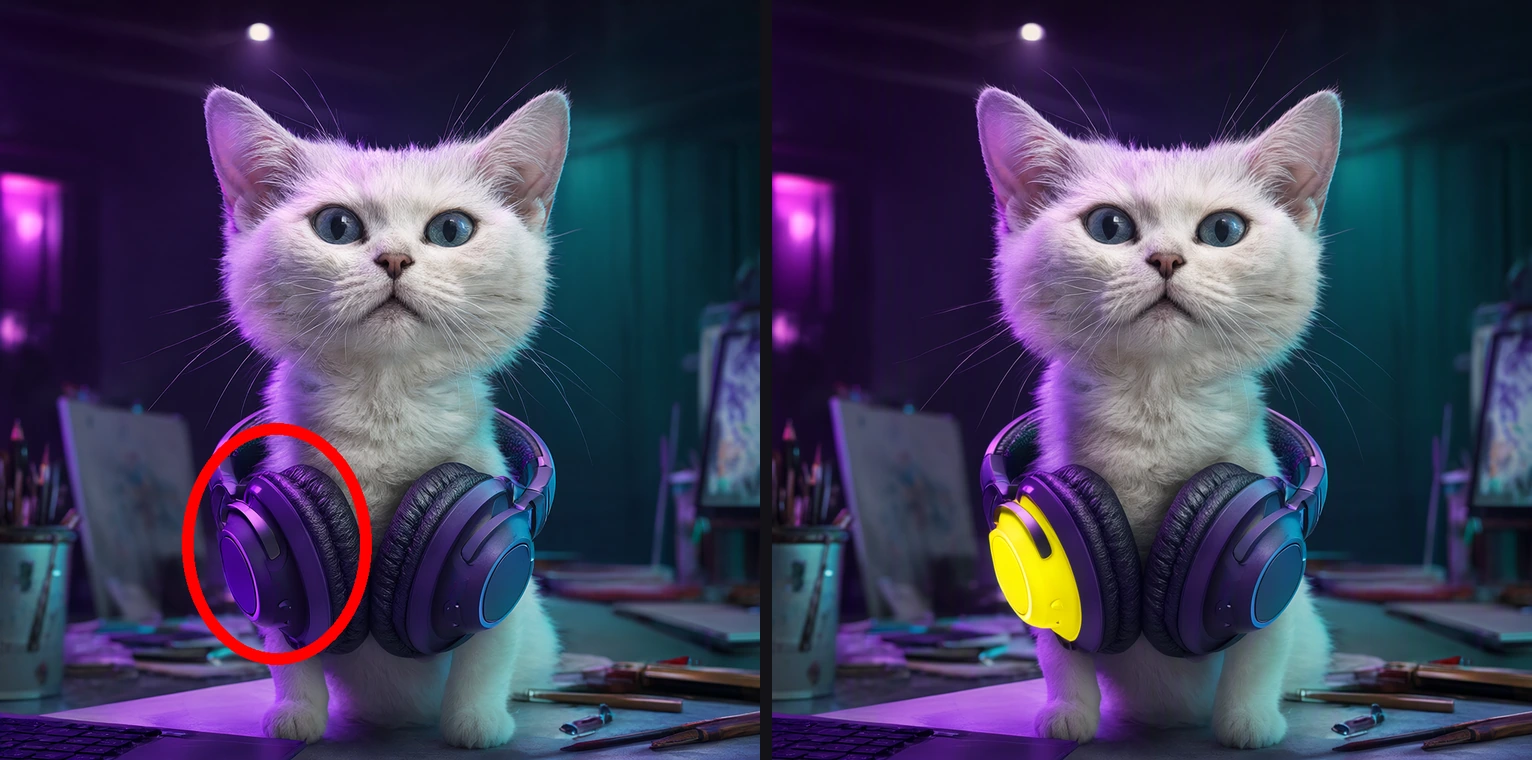
I took the white-cat image from an earlier round, drew a red circle around the left ear cup, and asked the model:
Change only the left ear cup inside the red circle to bright yellow, then remove the red circle. Keep the cat’s face, eyes, fur, other ear cup, background, lighting, and composition unchanged.
Here is the result. The input with the red circle is on the left, and the output is on the right:
The result was very clean.
The red circle disappeared from the final image, the circled ear cup changed from purple to yellow, and the cat’s face, the other ear cup, the studio background, and the overall composition were almost untouched.
This makes localized editing very intuitive. You do not always need to create a precise mask first; you can use a visual annotation to tell the model, “change this part.” The official examples also show painted annotations and separate masks. In this article, I actually tested circle-guided editing. I am not going to pretend I tested the other two methods locally when I did not.
Test 2: Two References Are More Than Style Inputs — the Model Actually Recombines Them
Next, I fed two completely different local images into the model at the same time:
- A white cat wearing purple headphones
- A black mechanical keyboard
I asked the model to place the same cat behind the keyboard while preserving the cat’s face and headphones, as well as the keyboard’s black body and keycap characteristics.
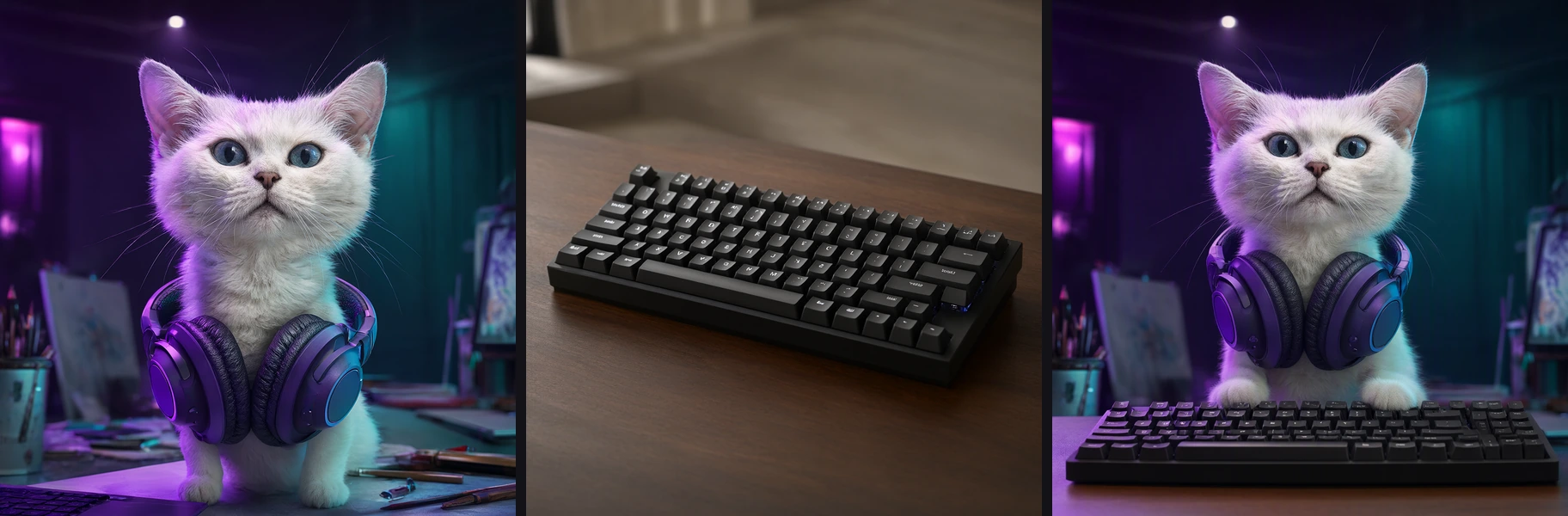
The result was not simply one image being used as a style reference. The two sources were actually recomposed into one scene.
The cat’s face, white fur, and purple headphones remained obvious, while the keyboard retained the form of a black mechanical keyboard and was repositioned into the foreground.
Of course, this does not mean reference fidelity is now equivalent to compositing 3D assets. The keycap details are not pixel-perfect copies of the original, and tiny characters are regenerated. But for the task of “give several assets to one model and ask it to build a coherent new scene,” this is already a different level of workflow.
Qwen officially claims support for up to 10 reference images. I have personally tested two, so I can confirm that two work on this machine. I am not going to describe “up to 10” as something I stress-tested locally one image at a time.
Test 3: Editing the Same Image Three Times Produces an Action Sequence, but Drift Accumulates
If image editing can preserve the original image, the next obvious question is: can you keep feeding the previous result back in?
I used the previous “cat + keyboard” result as frame 0 and applied three sequential edits:
- Raise one front paw
- Put the raised paw on the keyboard and press a key
- Look down at the keyboard and type with both front paws
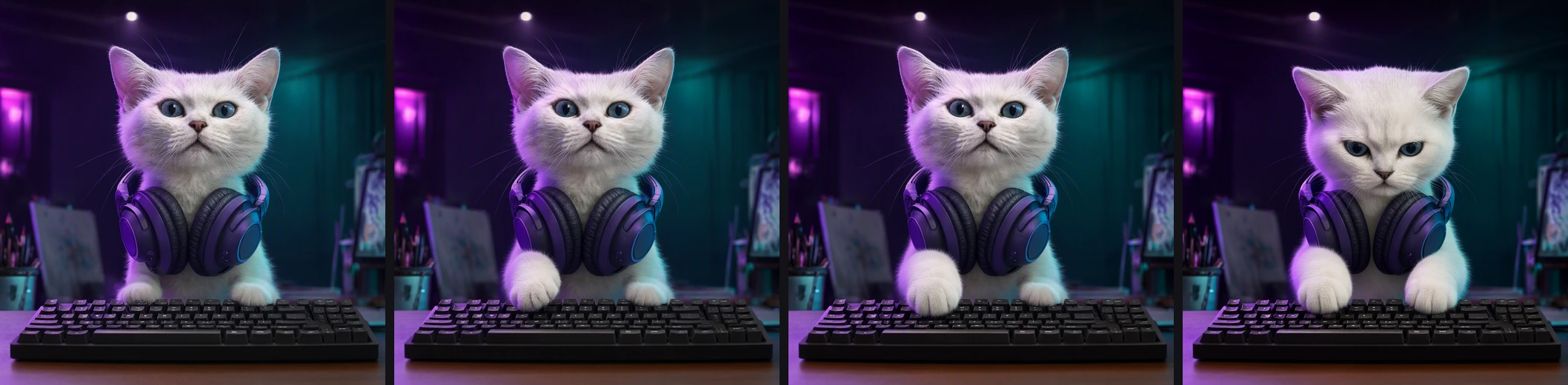
This result is interesting because it tells me both “yes, it works” and “do not get too optimistic.”
The first two edits preserve the character, headphones, keyboard, camera, and background very well, and the requested action changes are clearly there. By the third edit, however, even though the character is still obviously based on the same design, the face shape, ears, and overall youthful appearance have started to drift.
So Qwen-Image-2.1 can already be useful for sequence planning, storyboard drafts, and even chaining several frames into simple motion. But if I needed 20, 50, or 100 frames with perfectly consistent character identity, I would not rely only on this “previous output into next output” approach.
That is also why I think hands-on testing is more useful than only looking at official showcase images: the capability is real, but so is accumulated error.
Test 4: Transparent Background Means a Real Alpha Channel, Not a Fake Checkerboard
Another unusual update in Qwen-Image-2.1 is that its VAE natively supports RGBA.
I followed the official prompt pattern directly:
This is an RGBA image with transparency. A cute white cat mascot wearing purple over-ear headphones… The image has alpha channel and the background is transparent.
The generated result:

I also read the PNG’s alpha channel directly instead of judging it by eye:
- Alpha range: 0–255
- Fully transparent pixels: about 24%
- Partially transparent pixels: about 39%
- Fully opaque pixels: about 37%
So this is not the model painting a purple or checkerboard background that merely looks transparent. The file actually contains transparency data.
For stickers, character assets, presentation elements, UI assets, or product compositing, this is very practical because it removes an external background-removal step.
Test 5: A Normal Photo Can Be Extracted Directly into a Transparent Subject Layer
Native transparency is useful for more than generation from scratch.
I fed a portrait image from an earlier round back into Qwen-Image-2.1 and asked it to preserve the face, hair, white suit, pose, and full silhouette while removing the entire studio background and outputting RGBA.
The result:
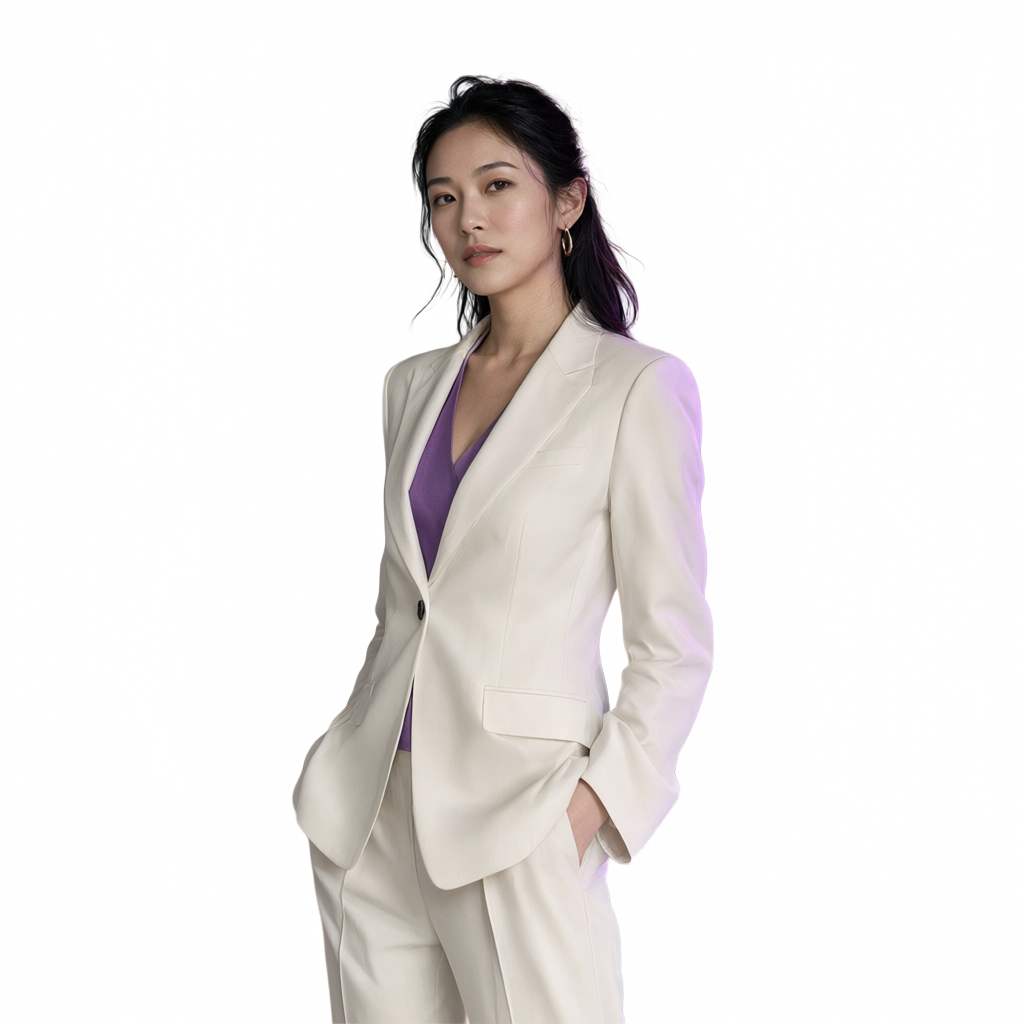
The output again contains a real alpha channel:
- Alpha range: 0–255
- Fully transparent pixels: about 37%
- Partially transparent pixels: about 44%
The subject’s facial features, clothing, and original pose remain quite intact, while the background is removed.
This changed my view of 2.1 again. It is not only “AI can generate a transparent PNG.” It is starting to reach into actual asset extraction / reusable layer workflows.
Test 6: Generate a Three-Panel Storyboard with the Same Character
The official showcase includes a storyboard example. Instead of repeating the official image, I tested it with my own white-cat reference.
I asked the model to create three panels in a single image:
- The cat walks toward the keyboard
- The cat raises one paw
- The cat types with both paws
I also asked it to keep the same white cat, the same purple headphones, the same studio, and the same overall color tone across all three panels.
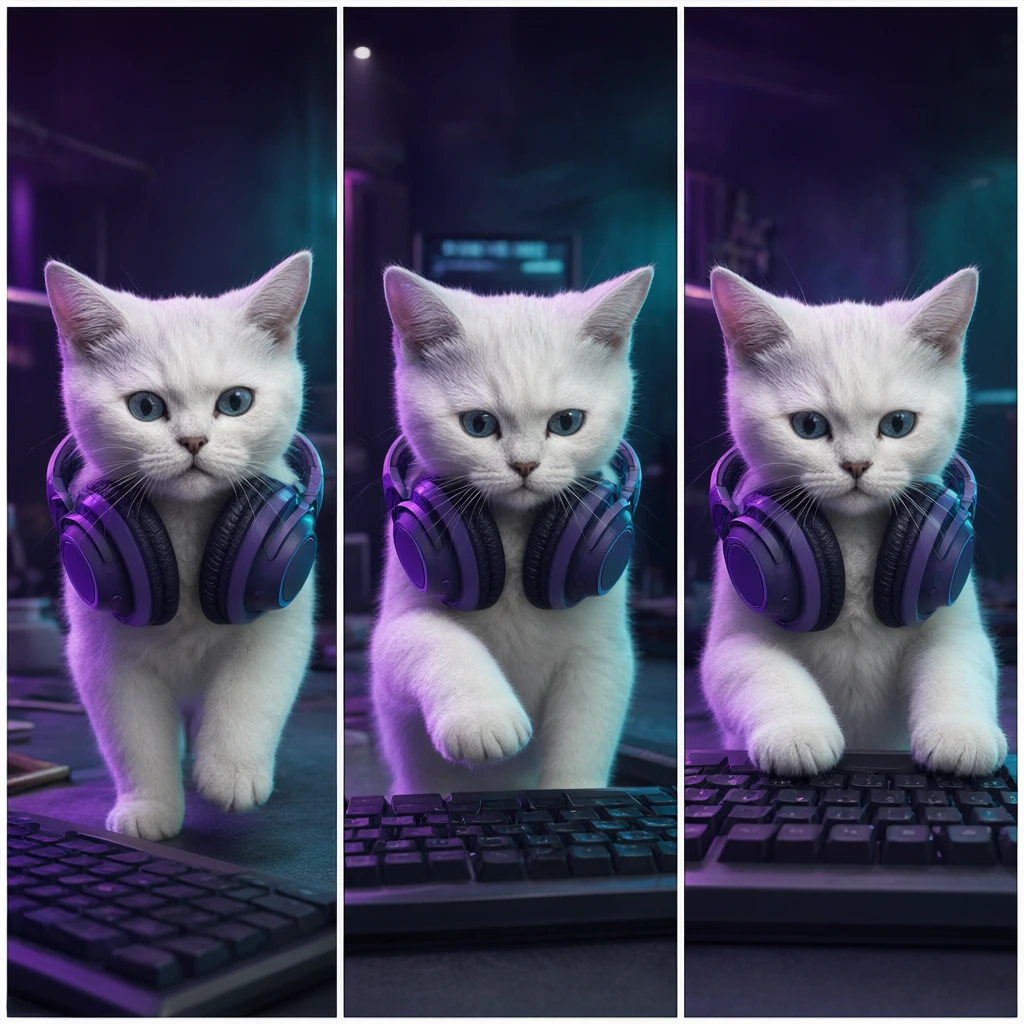
The result was better than I expected.
The model really produced three clear panels, and the character, headphones, and purple/cyan lighting carried across them. The actions also form a sequence instead of looking like three random cat images arranged next to each other.
It is obviously not an animation model, but for advertising shot planning, comic storyboards, short-video storyboards, or character-concept proposals, the use case of “one reference → a sequence of related frames” is already very clear.
Test 7: An RTX 5060 Ti 16GB Really Can Run 2048×2048 Directly
In the earlier version of this article, I wrote only that “the official model supports native 2K,” while the examples I had actually shown were all 1024×1024. This time, I ran it myself.
I set the resolution directly to 2048, kept 25 steps, and deliberately added typography requirements:
- The headline must be
QWEN IMAGE 2.1 - The subtitle must be
LOCAL IMAGE CREATION - A cat wearing purple headphones must appear in the center
Here is the result. The original file is 2048×2048:
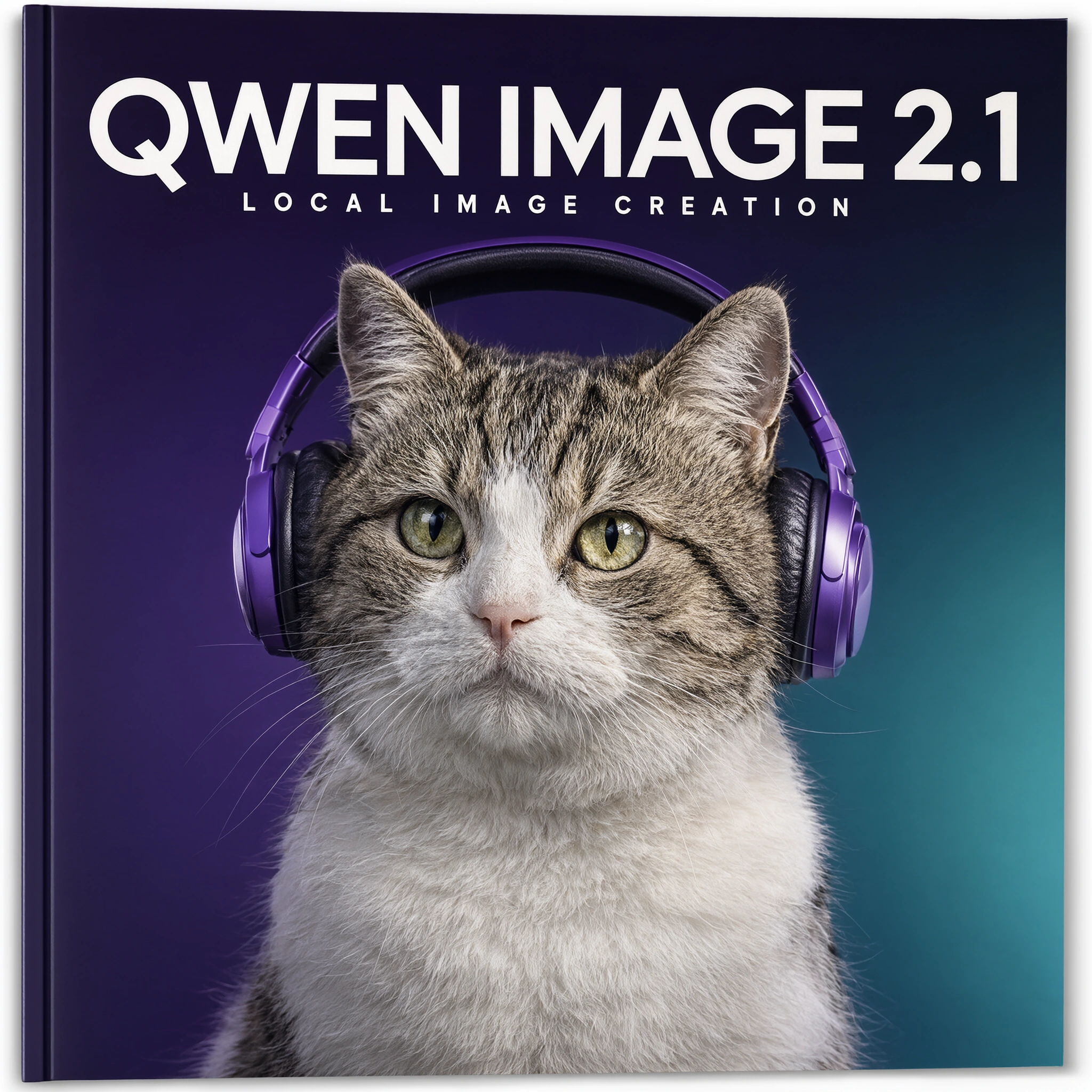
On my RTX 5060 Ti 16GB:
- 2048×2048 completed successfully
- 25 steps took about 129 seconds
- GPU utilization reached 100% during execution
- Observed VRAM usage was about 15.5GB
The text rendering is also worth noting: both QWEN IMAGE 2.1 and LOCAL IMAGE CREATION are correct and readable, and the layout does not look like the garbled typography often seen in older image-generation models.
But this image is not a perfect answer either. The prompt asked for a “white cat,” while the final image clearly looks like a white tabby cat. So this single image proves two things at once: 2K output and English typography are strong, but every visual attribute in a prompt still does not receive perfect obedience.
Looking Back at Basic Text-to-Image, It Feels More Like the Starting Point of 2.1
In the previous version of this article, I used several pure text-to-image outputs to test product photography, a Taipei street after rain, and portrait photography.
Those outputs were fine, and they still demonstrate how well 2.1 understands full-scene descriptions, material properties, lighting, and compositional relationships.
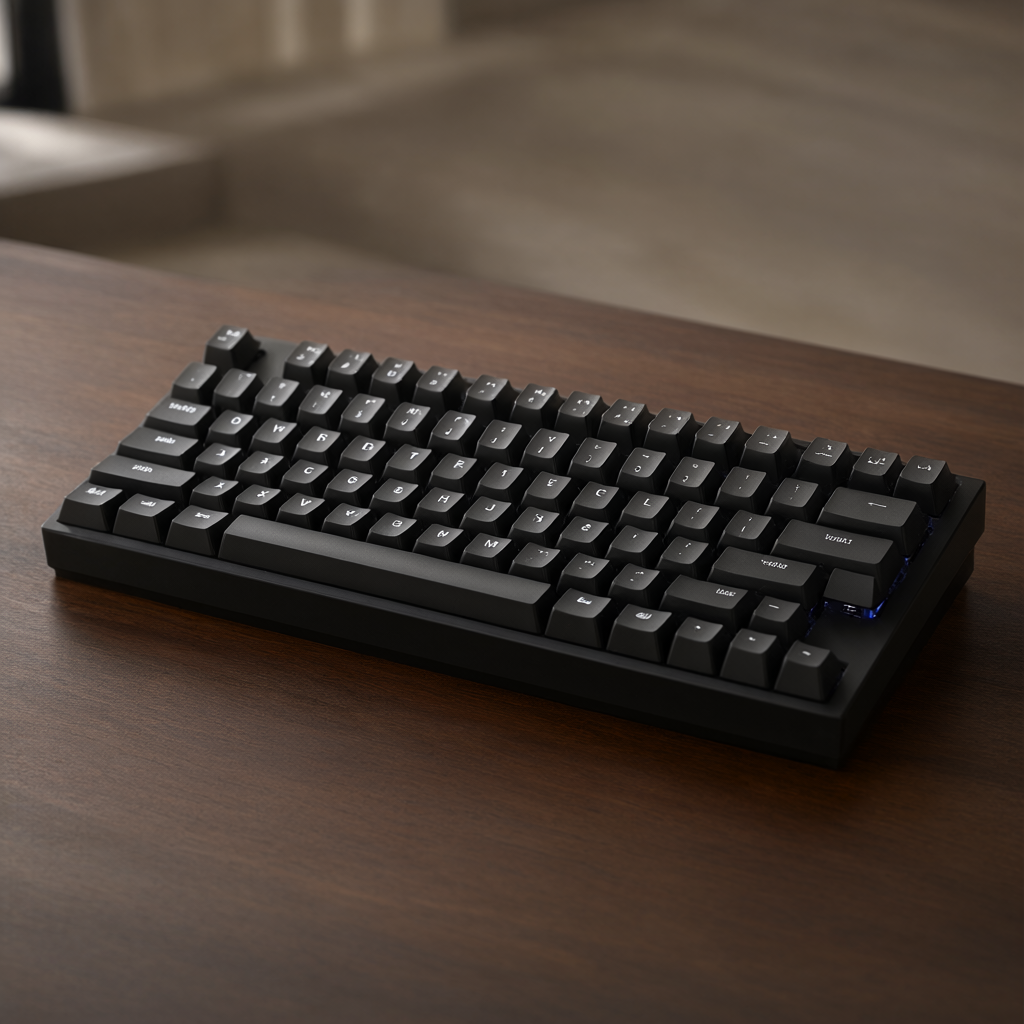
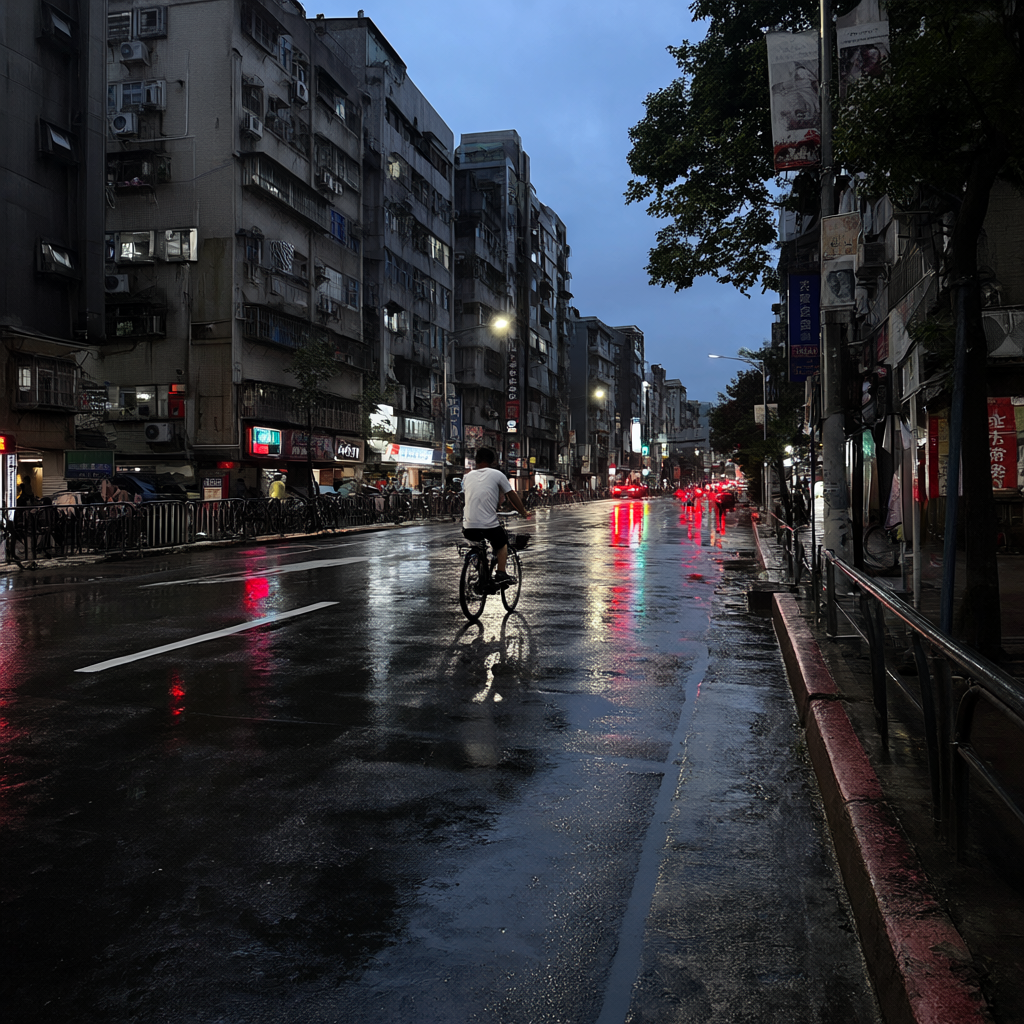
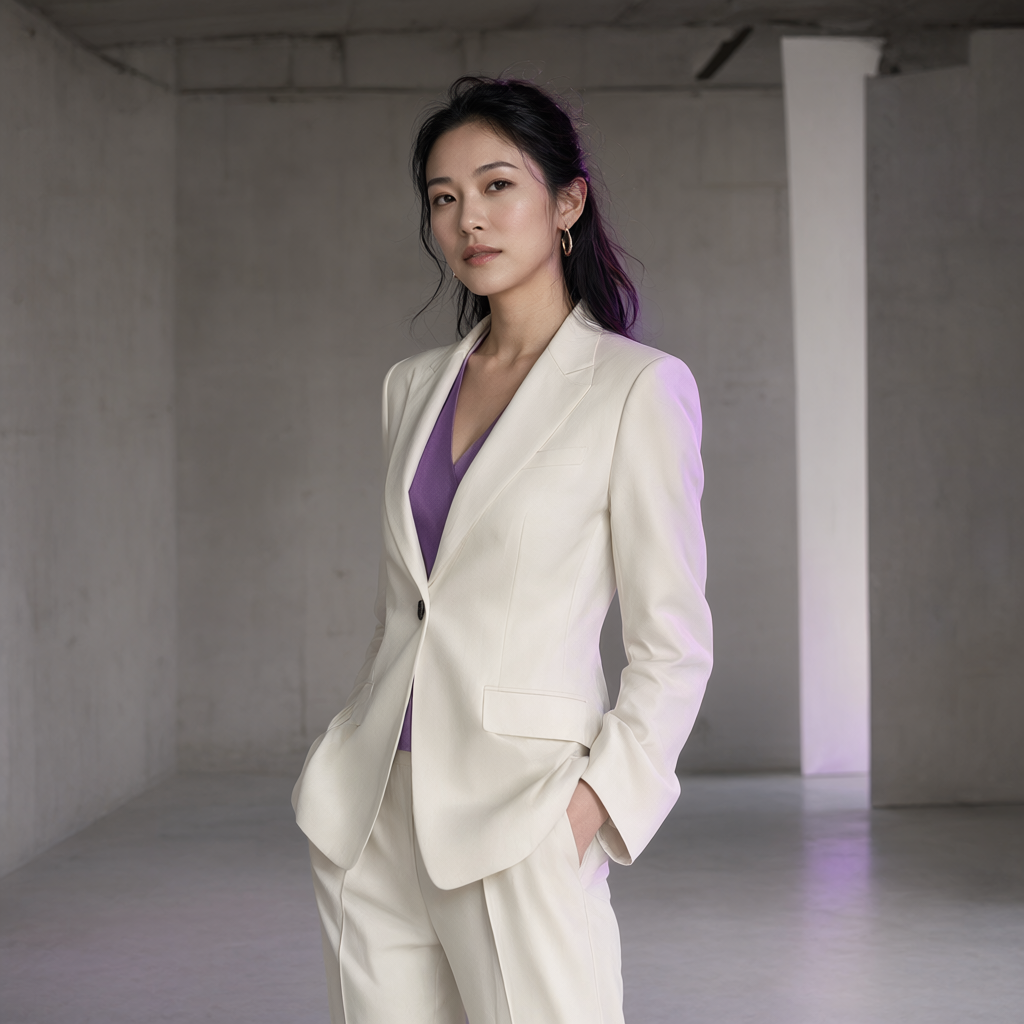
After running all of the tests above, though, I would no longer describe “better prompt understanding” as the main story of 2.1.
Text-to-image is the entry point. The more interesting part is this: you can keep using the result as material for the next step.
What Else Did the Official Showcase Demonstrate, and What Did I Not Pretend to Test?
Qwen’s official material demonstrates more editing scenarios than I tested here, including:
- Up to 10 reference images
- Painted annotation
- Separate masks for localized editing
- Multi-person compositing
- Virtual try-on combining a person, clothes, shoes, bags, and hats
- Interior-space recomposition using multiple furniture references
- Portrait and product identity / fidelity preservation
- Panorama
- Text and typography generation
You can see these capabilities in the official release and GitHub showcase.
But in this article, I label only the items that I actually ran on the 5060 Ti as hands-on tests: circle-guided local editing, two references, sequential editing, RGBA generation, RGB → RGBA subject extraction, Storyboard, and 2048×2048 + typography.
I will add results for the others after I really test them.
Why Can ComfyUI Suddenly Do So Much More?
From a workflow perspective, the key node is the newer TextEncodeQwenImage21.
It accepts more than text. It can also take multiple reference images. Those images are fed into the Qwen3-VL text encoder and, when a VAE is available, converted into reference latents for Qwen-Image-2.1.
My current ComfyUI node even exposes up to 16 image slots. However, Qwen’s official model documentation claims and tests a limit of 10 images, so in actual use I follow the official model specification instead of seeing 16 UI slots and declaring support for 16 references.
That is one of the architectural choices I like most about this release: the model does not treat “text” and “images” as completely separate entry points. It understands them inside the same conditioning flow.
Licensing
At the moment, the official Qwen-Image-2.1 repository and model page are labeled under the Qwen Research License Agreement, not Apache 2.0.
If I were using it in a product, client project, or another commercial context, I would refer directly to the current official LICENSE text instead of inferring usage rights from community posts or the model name.
The model license, ComfyUI license, third-party node licenses, and rights associated with final outputs are also separate issues and should be checked independently for commercial use.
Conclusion: Qwen-Image-2.1 Feels More Like a Local Photoshop AI Layer Than a Slot Machine for Images
If I looked only at my earliest T2I outputs, I might summarize Qwen-Image-2.1 as: better-looking images, better prompt understanding, and native 2K support.
But after running the editing workflow end to end on my own 5060 Ti, that description feels too small.
What I care about is this chain:
Generate → reference multiple images → make a localized edit → continue editing the previous result → extract a transparent layer → build a Storyboard → output a finished 2K image directly.
These steps can now increasingly remain inside the same model.
It is not a replacement for Photoshop, and it is not an animation model that keeps character identity perfectly stable forever. By the third sequential edit, I can already see identity drift, and multi-image reference is still not pixel-perfect asset copying.
But Qwen-Image-2.1 has moved local image models one step beyond “draw me one picture” toward “keep working with a set of visual assets for me.”
For me, that is the most interesting part of 2.1.